Launching a mobile game is not the same as launching a utility app. The announcement strategy is different. The assets are different. And the audience you are trying to reach responds to completely different triggers.
A task manager sells on features. A game sells on feeling. A person downloads a productivity app because it solves a specific problem they already know they have. A person downloads a game because something about the announcement – a trailer, a screenshot, a headline – made them feel something before they had touched a single pixel of actual gameplay.
Your announcement needs to create that feeling before anyone has downloaded a single byte. Here is how to build a launch announcement that does exactly that – and why most indie developers get this wrong in ways that cost them their launch momentum entirely.
The Game Announcement Is Not the Same as the Play Store Listing
Most developers treat their Play Store listing as their game announcement. It is not. The listing is a conversion page – it exists to turn someone who has already heard about your game into a download. The announcement is what gets people there in the first place.
Your announcement strategy needs to exist outside the Play Store. It lives in press coverage, community posts, social content, YouTube, and most importantly – a written launch release that tells the story of your game before anyone has played it. The Play Store listing closes the deal. The announcement is what starts it.
The mistake almost every first-time game developer makes is launching silently: publishing to the Play Store, posting once on social media with a screenshot and a link, and then waiting to see what happens. That is not a launch strategy. That is a hope. And in a market where thousands of games publish every month on Android, hope is not a distribution channel.
A proper Android game launch announcement has five components. Each one exists for a specific reason. Missing any of them reduces the impact of the others.
1. Lead With the World, Not the Mechanics
When you write about your game for press platforms, editorial sites, and community posts, do not open with a feature list. Open with the world your game creates.
Compare these two openings for the same hypothetical game:
Weak: “PixelRift is a 2D platformer with 40 levels, a power-up system, and unlockable characters available now on Android.”
Strong: “PixelRift drops players into a fractured dimension where every wall is a door and every door leads somewhere worse. The studio’s debut Android title launches June 10 on the Play Store.”
The second version creates a question in the reader’s mind. That question is what earns the click. The mechanics – 40 levels, power-up system, unlockable characters – belong in the body of the announcement, not the opening line. They are the answer to the question the strong opening creates, not the reason to care in the first place.
Lead with atmosphere, genre, and one compelling hook. Make the reader feel the game before you explain it. Then follow with what the game actually involves. This is the single most important copywriting shift a game developer can make when writing their own press materials – and the one that makes the largest difference to click-through rates from announcement to Play Store listing.
2. Your Visual Assets Are Your Announcement
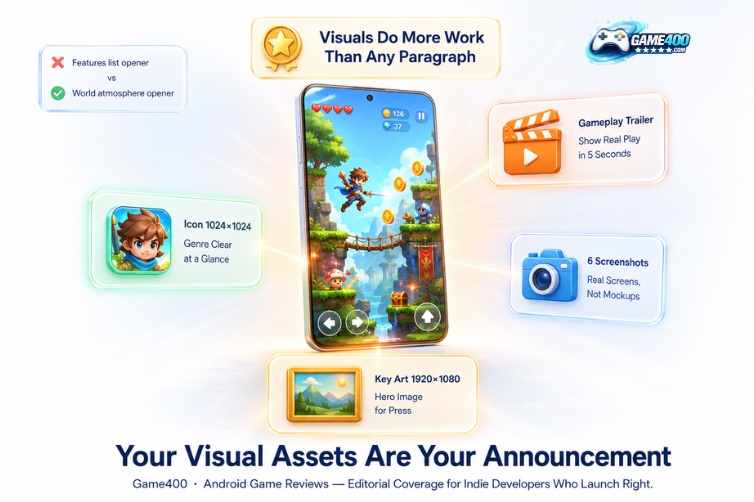
For a game, screenshots and video do more work than any written paragraph. Press sites, gaming blogs, YouTube creators, and community platforms will use your visual assets before they use your words. If your visuals are weak, vague, or unrepresentative of the actual gameplay experience, you will not receive coverage – regardless of how strong the game itself is.
A complete game launch visual asset pack must include every item on this list:
- A gameplay trailer – minimum 30 seconds, maximum 90. Show actual gameplay within the first five seconds. Do not open with a logo animation, a title card, or a cinematic sequence that does not represent the real game loop. Players and press skip intros immediately. Your best gameplay moment needs to be visible in the first five seconds or your trailer is not working
- Gameplay screenshots – at minimum six images, showing different levels, mechanics, enemy types, environments, or key moments. No UI mockups. No concept art. Real screens from real play sessions, ideally showing the most visually distinctive moments the game has to offer
- Key art at 1920×1080 – a single hero image that represents the game visually without requiring any text to understand. This is what press sites use as the article header image. It needs to work as a standalone visual communication of what your game is and feels like
- App icon at 1024×1024 PNG – game icons on Android are competitive in a way that utility app icons are not. Yours needs to communicate genre and tone at a glance and read clearly at 48×48 pixels on a crowded home screen beside dozens of other apps
Compress everything. Host everything at a publicly accessible URL – a Google Drive folder or a dedicated press page on your website. Link to that folder in every pitch. Do not attach files to emails; attachments get flagged as spam and prevent your pitch from reaching the person you are trying to reach.
You can see the visual standards that strong game launches meet by browsing our Android game reviews section – specifically looking at the games that received the most thorough coverage and what their visual presentation had in common.
3. Write and Publish a Press Release Before You Pitch Anyone
Before you contact a single gaming blog, YouTuber, or press platform, your game needs a published press release on at least one indexed platform. This is not optional for an Android game launch announcement that wants editorial coverage.
A press release does three things for a game launch that nothing else does. First, it creates a timestamped public record of your launch that search engines index and that any journalist can link to. Second, it generates backlinks from the platforms that pick it up – which builds domain authority for your studio’s own website. Third, it gives every content creator who receives your pitch a reference document to pull from, which reduces the number of follow-up questions they need to ask you and increases the chance that their coverage is accurate.
When you submit to dedicated Android game press platforms like AndroidNewswire, your release gets distributed across a network of Android-focused publications simultaneously. Many developers use this as part of a broader app launch service – a structured process that handles press distribution, asset preparation, and outreach sequencing so nothing gets missed in the week before go-live. That simultaneous distribution is what seeding looks like at scale – multiple indexed pages referencing your game exist before your broader press push begins, which means every outlet you pitch can verify your game’s existence and context with a single search. That verification step matters more than most developers realise.
Write your press release like a news story, not a product description. Announce the game. Name the studio. Describe the world and genre in two sentences using the atmosphere-first approach described above. List three to five specific features. Include a developer quote about what inspired the game or what makes it different. Link to the trailer on YouTube and to your Play Store listing. Keep it under 500 words. Publish it before you send a single pitch.
4. Stage Your Announcement – Do Not Launch All at Once
The biggest mobile game launches use a staged announcement structure that builds awareness before it builds downloads. Indie and solo developers can apply the same structure at smaller scale – and the developers who do consistently outperform on launch week metrics compared to those who treat launch as a single event.
Stage 1 – Reveal (2 to 4 weeks before launch): Announce that the game exists. Publish the key art and a short teaser – 15 to 30 seconds of your most visually striking gameplay. Submit to press platforms. Set up pre-registration on the Play Store if your game qualifies. The goal at this stage is awareness and wishlists, not downloads. You are planting the name in people’s minds before you ask them to act on it.
Stage 2 – Preview (1 week before launch): Release your full gameplay trailer and complete screenshot set. Pitch gaming blogs and YouTube channels with your press release and media pack. The goal at this stage is to secure coverage commitments that go live on launch day, creating a concentrated arrival of editorial mentions when the game actually releases.
Stage 3 – Launch (Day 0): Play Store listing goes live. Press release is published and distributed. Social posts go out across every platform you have a presence on. Respond to every comment, review, and message within the first 48 hours. The Play Store algorithm pays attention to early engagement velocity – responding quickly to early reviews signals an active developer to both the algorithm and to potential downloaders reading those reviews.
Stage 4 – Post-launch (Week 1 to 2): Share early player feedback, community screenshots, and any press coverage you received. If a reviewer published a piece about your game, share it everywhere – their credibility extends to your game when you share their coverage. The goal at this stage is sustaining momentum and feeding the algorithm with continued engagement signals after the launch spike fades.
Most developers only execute Stage 3. The developers who execute all four stages – even at small scale, even with minimal resources – consistently outperform on download velocity, review score accumulation, and algorithmic placement in the weeks after launch. The difference between a game that maintains momentum and one that peaks on day one and fades is almost always the presence or absence of Stages 1, 2, and 4. Our general Android gaming guides cover monetisation strategy, player retention, and post-launch optimisation in more depth if you are planning beyond the announcement stage.
5. Community Seeding Is Not Optional for Mobile Games
Unlike productivity apps, games live and die in communities. Reddit, Discord servers, Facebook groups, and niche gaming forums are legitimate and important launch channels – not secondary afterthoughts you get to if you have time after the main marketing push.
The rules for community seeding that every developer needs to follow precisely:
- Be a member of the community before you announce your game in it. Reddit’s r/AndroidGaming, r/indiegaming, and platform-specific Discord servers will identify and remove promotional posts from accounts that only appear to self-promote. Spend time in these communities, engage with other developers’ posts, and contribute value before you announce anything
- Follow each platform’s self-promotion rules exactly. Most communities have specific days or threads for developer self-promotion. Use them. Posting outside these rules guarantees removal and can get your account banned from the community entirely
- Post gameplay, not marketing copy. A GIF of your game’s most distinctive mechanic with a “I made this – be honest” caption performs significantly better than a promotional paragraph about your game’s features. Communities respond to authenticity and visible craft, not marketing language
- Respond to every reply personally and specifically. Especially the critical ones. A developer who engages thoughtfully with criticism in a community thread builds more goodwill and more long-term community support than one who only responds to positive comments
A genuine community post that generates 20 replies and 15 upvotes does more for your game’s algorithmic discoverability than three press mentions that generate no engagement at all. Community engagement signals are real and measurable, both within those platforms and in how they translate to organic discovery in the Play Store. If you want to submit your game for editorial review consideration, our games review section shows the standard we apply and the types of games we cover – knowing that context before you pitch makes your pitch more relevant and more likely to result in coverage.
The Complete Game Launch Announcement Checklist
| Item | Stage | Notes |
|---|---|---|
| Press release written and published on at least one indexed Android platform | Before reveal | Publish 7 to 10 days before pitching press |
| Gameplay trailer hosted on YouTube – not just Google Drive | Reveal or preview | YouTube videos rank on Google – Drive links do not |
| Key art, screenshots, and icon at a public shareable URL | Before reveal | Do not attach files to pitch emails |
| Play Store listing complete – description, all screenshots, feature graphic, trailer link | Before launch | Early Access listing acceptable for pre-launch pitching |
| Community posts prepared and scheduled separately from press release | Launch day | Different tone and format for each community |
| Staged timeline confirmed – reveal, preview, launch, post-launch | Pre-launch planning | Most developers skip Stages 1, 2, and 4 |
The games that get covered are the ones that give press, community, and editorial platforms something concrete to work with. Build the assets, write the announcement, publish the press release, seed it properly, and then launch. The difference between a game launch that generates momentum and one that generates nothing is almost always the preparation that happened in the weeks before the Play Store listing went live – not the game itself.
Frequently Asked Questions
Q: How far in advance should I start announcing my Android game before launch?
Four weeks is the minimum for a staged announcement that gives each phase enough time to build on the previous one. The reveal at four weeks plants awareness. The preview at one week builds anticipation and secures press commitments. Launch day concentrates the editorial coverage. Two weeks of post-launch engagement sustains the algorithm signal. Developers who start announcing less than a week before launch are only executing Stage 3 of a four-stage strategy – and they will see the corresponding gap in launch performance compared to games that ran the full sequence.
Q:Does an indie mobile game really need a press release?
Yes – for two reasons that apply specifically to indie games. First, a press release on a dedicated Android platform creates the indexed reference point that allows any journalist, YouTuber, or community member to verify your game’s details without emailing you. Second, it signals that you take your launch seriously enough to have done the work of writing and publishing one. Both of these signals meaningfully improve your coverage rate from the same outreach effort. The press release does not need to be long – under 500 words is the target – but it needs to exist and be indexed before you pitch anyone.
Q:What is the most common mistake indie developers make when announcing an Android game?
Launching silently. Publishing to the Play Store, posting once on social media, and waiting. This approach treats the Play Store as a distribution-and-discovery platform, which it is not. The Play Store is a conversion platform. Discovery happens through press coverage, community engagement, social content, and YouTube – and those channels require content that is produced and distributed before launch day, not on it. The most common single mistake is treating launch day as the start of the marketing effort rather than the culmination of a four-week announcement sequence.
Q:Should my gameplay trailer be a cinematic or show real gameplay?
Show real gameplay within the first five seconds – always. Cinematic trailers that do not represent the actual game experience generate clicks but not downloads, because players arrive at the Play Store listing expecting one game and finding another. That mismatch produces negative early reviews that damage your algorithmic ranking at the most critical moment. A gameplay trailer that accurately represents the experience – showing your best, most distinctive mechanics upfront – generates downloads from people who want exactly what you are offering. Those players leave better reviews and retain longer.
Q:How do I submit my game to Game400 for review?
Send your game details – Play Store link, press release link, gameplay trailer, and media asset pack URL – to our editorial contact. Having all elements of the launch checklist complete before you submit significantly improves your selection likelihood. We cover Android games across all genres, with particular attention to games that offer something mechanically or visually distinctive from what is already well-represented in the catalogue. Games submitted with a published press release and complete media pack are reviewed first.